 Ask Alvin (AI Chat)
Understanding Menu Manager Action Icons and Statuses
Each page row in the Menu Manager includes controls and status indicators that help you manage that page.
The row actions you see depend on your CMS permissions. Users with restricted permissions may not be able to access all features.
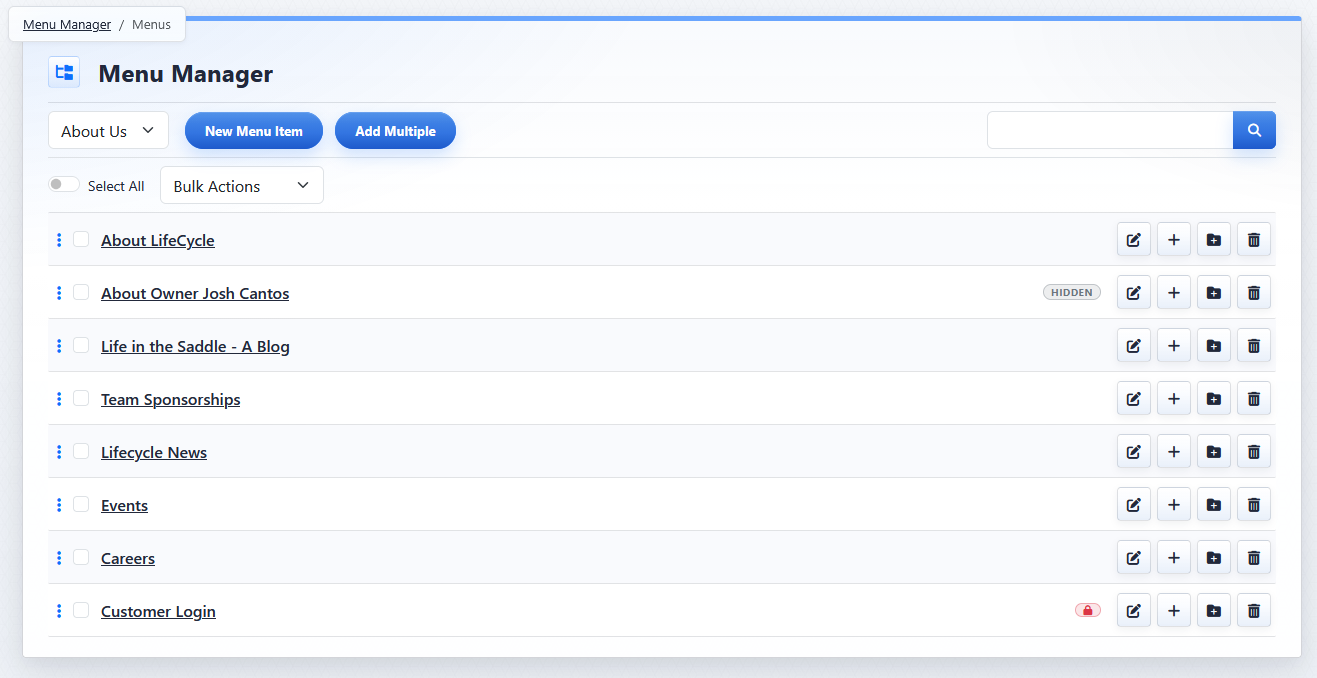
The Menu Manager list view shows row actions, selection controls, and status indicators for each page.
Row Controls and Statuses
| Control or Status | What it means |
|---|---|
 |
Row action buttons Use Edit, Add New Sub Menu, Add Multiple Submenus, or Delete to manage an individual page. For related tasks, see Editing an Existing Page in the Menu Manager, Creating Subpages in the Menu Manager, Creating Multiple Pages or Subpages, and Deleting Pages from the Menu Manager. |
 |
Drag handle and checkbox Use the drag handle to move or reorder pages. Use the checkbox to select a page for Bulk Actions. For details, see Moving and Reordering Pages in the Menu Manager and Selecting Pages and Using Bulk Actions. |
 |
Hidden The page is hidden from generated public navigation. It is not the same as deleting the page. For more detail, see Setting Page Visibility and Indexing. |
 |
No-Index and Locked No-Index means the page is marked as no-index for search engines. Locked means the page is password protected for public visitors. For more detail, see Setting Page Visibility and Indexing and Password Protecting a Page. |
Status indicators help explain how a page behaves, but they do not replace the page settings themselves. To change a page's visibility, indexing, or password settings, open the page's edit view and update the appropriate options.