 Ask Alvin (AI Chat)
Understanding Menu Manager Sections
Sections are the primary content areas available in the Menu Manager. Each page belongs to one section, and the section selector controls which section's pages are shown in the page list.
When a site has more than one section, the section selector appears above the page list. Click the selector to choose a different section.
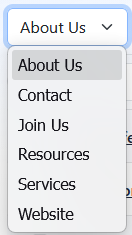
After you choose a section, the Menu Manager reloads the page list for that section. Any search term, selected rows, and expanded page rows are cleared when you switch sections.
The selected section matters when you create new pages. A new top-level page created with New Menu Item is added to the current section. Pages created from Add Multiple are also added to the current section when Quick Add is launched from the Menu Manager toolbar.
Smaller sites may only have a single Website section. When Website is the only section, you will not need to switch sections during normal Menu Manager work.