 Ask Alvin (AI Chat)
Getting Started with the Alerts Manager
The Alerts Manager is used to create and manage public alerts on the website.
To access, click on the Alerts Manager from the Plugins accordion.
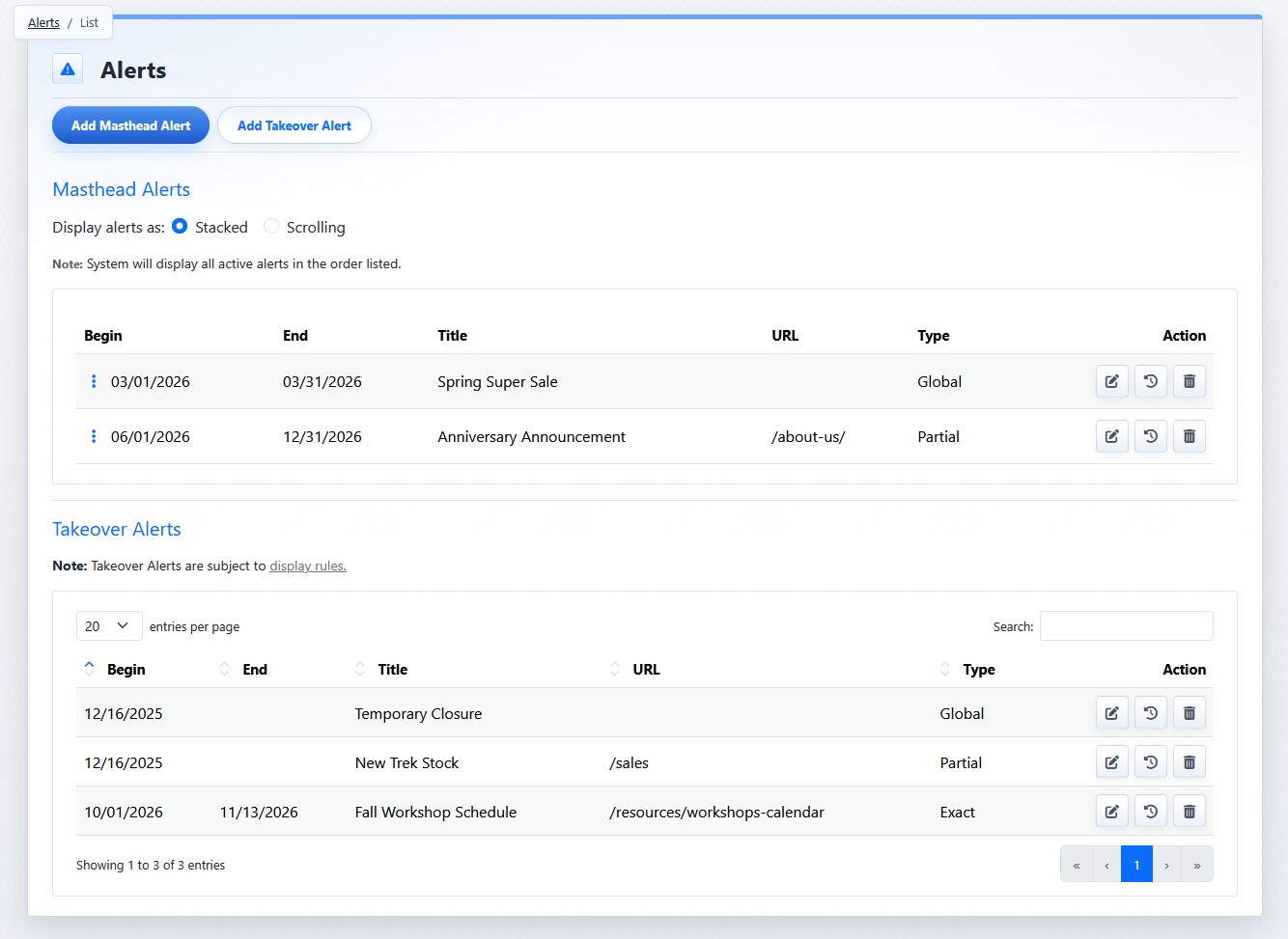
The Alerts Manager list view is divided into Masthead Alerts and Takeover Alerts.
The Alerts Manager list view is divided into two alert sections:
- Masthead Alerts: alerts that appear at the top of the site, typically above the navigation.
- Takeover Alerts: alerts that appear as modal windows over the site.
The Masthead Alerts section lists masthead alerts currently configured for the site. Masthead alerts include a display setting that controls whether active masthead alerts appear stacked or scrolling.
The Takeover Alerts section lists takeover alerts currently configured for the site. Takeover alerts are subject to display rules because only one takeover alert can display on a page at a time.
Alert list rows include information such as begin date, end date, title, URL, type, and action buttons.
The Title shown in the list is an internal CMS label. It helps identify the alert in the CMS and is not displayed publicly.
The Type value controls where the alert displays:
- Global: displays across the site.
- Partial: displays for a URL path and related subpages.
- Exact: displays only on the specified URL.
The URL column is used when an alert is limited to a specific URL or URL section.
To get started, you can click the Add Masthead Alert button to create a new masthead alert, or click the Add Takeover Alert button to create a new takeover alert.
| Control | What It Does |
|---|---|
 |
Add Masthead Alert opens the masthead alert detail view so you can create a new masthead alert. |
 |
Add Takeover Alert opens the takeover alert detail view so you can create a new takeover alert. |
The controls you see depend on your CMS permissions. Users with restricted permissions may not be able to access all features.
Learn More
For help deciding which alert type to create, see Choosing Between Masthead Alerts and Takeover Alerts. For action buttons and history, see Using Alert Actions, History, and Deletion. For display rules, see Understanding Alert Display Rules and Scheduling.