 Ask Alvin (AI Chat)
Understanding Inherited Page Settings for Subpages
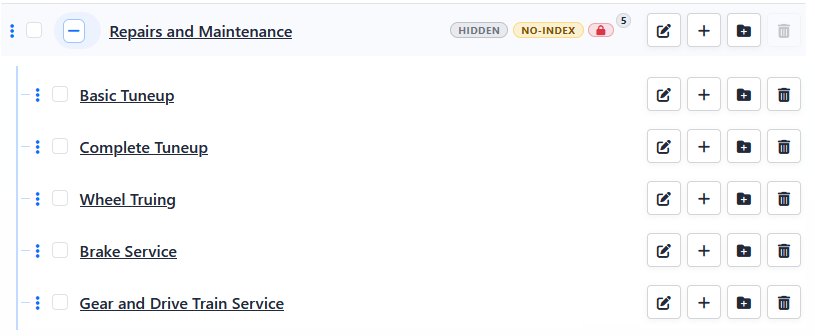
Some page behavior for child pages is governed by the parent page. This can explain why a child page behaves as hidden, no-index, or password protected even when the child page's own settings do not show that value directly.
Settings That Can Affect Child Pages
Child pages can be governed by a parent page's:
- Active? setting
- Index this page? setting
- Password setting
Inherited Behavior Is Ongoing
Inherited behavior is not a one-time value copied into the child page. If the parent page changes, the child page's effective behavior can change with it.
If a child page is moved under a different parent, the child page follows the new parent's inherited behavior.
Why Inherited Settings Can Be Hard to Spot
Inherited behavior can affect a child page even when the child page's own edit view does not show the inherited value directly. It also does not always appear as an individual status indicator on the child page row.
If a child page is unexpectedly hidden from navigation, marked no-index, or password protected, check the parent page first.
Related Tasks
Learn More
For creating one child page, see Creating Subpages in the Menu Manager. For creating several child pages at once, see Creating Multiple Pages or Subpages.
For the settings that can be inherited, see Setting Page Visibility and Indexing and Password Protecting a Page.