 Ask Alvin (AI Chat)
Setting News Article Details
News article details control publication status, timing, article ownership, and reusable press information.
These controls appear near the top of the article detail view.
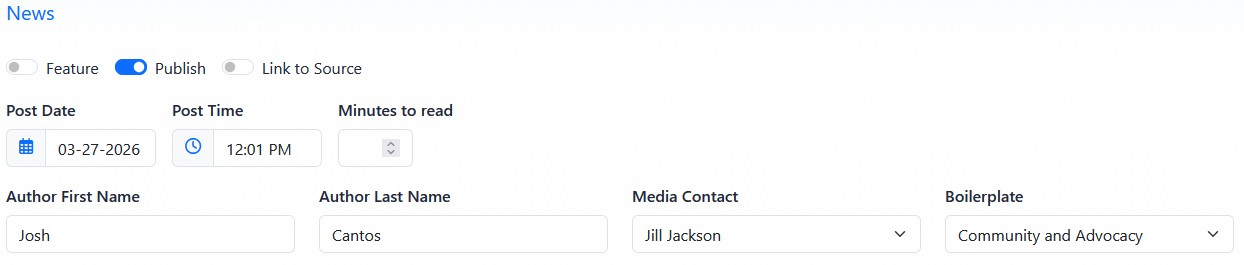
News article detail fields control publication status, timing, author information, media contact, and boilerplate selection.
The Feature toggle marks the article as featured content. Featured articles can receive special placement on public News & Press pages when the selected page layout supports featured articles.
The Publish toggle controls whether the article is public. Turn Publish on when the article should be available to visitors. Turn it off when the article should remain saved in the CMS but not publicly visible.
The Link to Source toggle is used when the News & Press item should send visitors to an external source instead of displaying a full CMS-entered article.
Use Link to Source when you want to list an article, press release, or announcement that lives somewhere else. When Link to Source is enabled, the CMS stores the external source URL and hides content-entry fields that are not needed for a full internal article.
Post Date and Post Time control the date and time associated with the article. The date is used for article ordering and can display publicly depending on the page settings.
Minutes to read stores an estimated reading time. This value appears publicly only when the public News & Press page is configured to show read time.
Author First Name and Author Last Name identify the article author.
Media Contact selects a reusable press contact from the Profile module. Use this when the article should include a contact person for media or public inquiries.
Boilerplate selects a reusable organization description from the Profile module. Use this when the article should include standard organization information, often at the end of a press release.
The public display of author, date, time, read time, media contact, and boilerplate depends on the settings for the public News & Press page where the article appears.
Important: An article is publicly visible only when Publish is on and the article's Post Date and Post Time have arrived. A future post date can schedule when a published article becomes visible, but it does not turn Publish on automatically. If Publish is off, the article remains unpublished even after its post date passes.
Learn More
For writing article copy, see Writing News Article Content. For managing reusable media contacts and boilerplates, see Managing News Media Contacts and Boilerplates. For public detail page settings, see Configuring News Detail View, Sharing, and RSS Options.