 Ask Alvin (AI Chat)
Setting Blog Post Details and Comment Options
Blog post details control publication status, timing, featured placement, commenting, and author attribution.
These controls appear near the top of the post detail view.
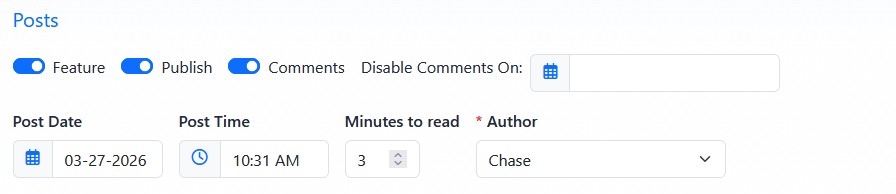
Post detail controls manage featured status, publishing, comments, dates, read time, and author assignment.
Publication and Featured Settings
The Feature toggle marks the post as featured content. Featured posts can receive special placement on public Blog pages when the selected page layout supports featured posts.
The Publish toggle controls whether the post is public. Turn Publish on when the post should be available to visitors. Turn it off when the post should remain saved in the CMS but not publicly visible.
For a post to be publicly visible, Publish must be on and the post date must be current or in the past. A future post date does not automatically turn Publish on later. If a post is scheduled for a future date, Publish still needs to be on before the post can appear when that date arrives.
Comment Settings
The Comments toggle controls whether visitors can submit comments on the post.
When Comments is on, the public post page shows the comment form.
When Comments is off, visitors cannot submit comments on that post.
Disable Comments On lets you set a date when comments should stop being accepted for that post. This is useful when comments should be open for a limited time after publication.
Date, Read Time, and Author
Post Date and Post Time control the date and time associated with the post. The date is used for post ordering and can display publicly depending on the page settings.
Minutes to read stores an estimated reading time. This value appears publicly only when the public Blog page is configured to show read time.
Author selects the author profile associated with the post. Authors are managed in the Author Manager.
The public display of author, date, time, and read time depends on the settings for the public Blog page where the post appears.
Learn More
For writing post copy, see Writing Blog Post Content. For author records, see Managing Blog Authors. For public detail page settings, see Configuring Blog Detail View Options.