 Ask Alvin (AI Chat)
Writing Blog Post Content
Blog post content fields control the post's title, public URL, summary, and main body copy.
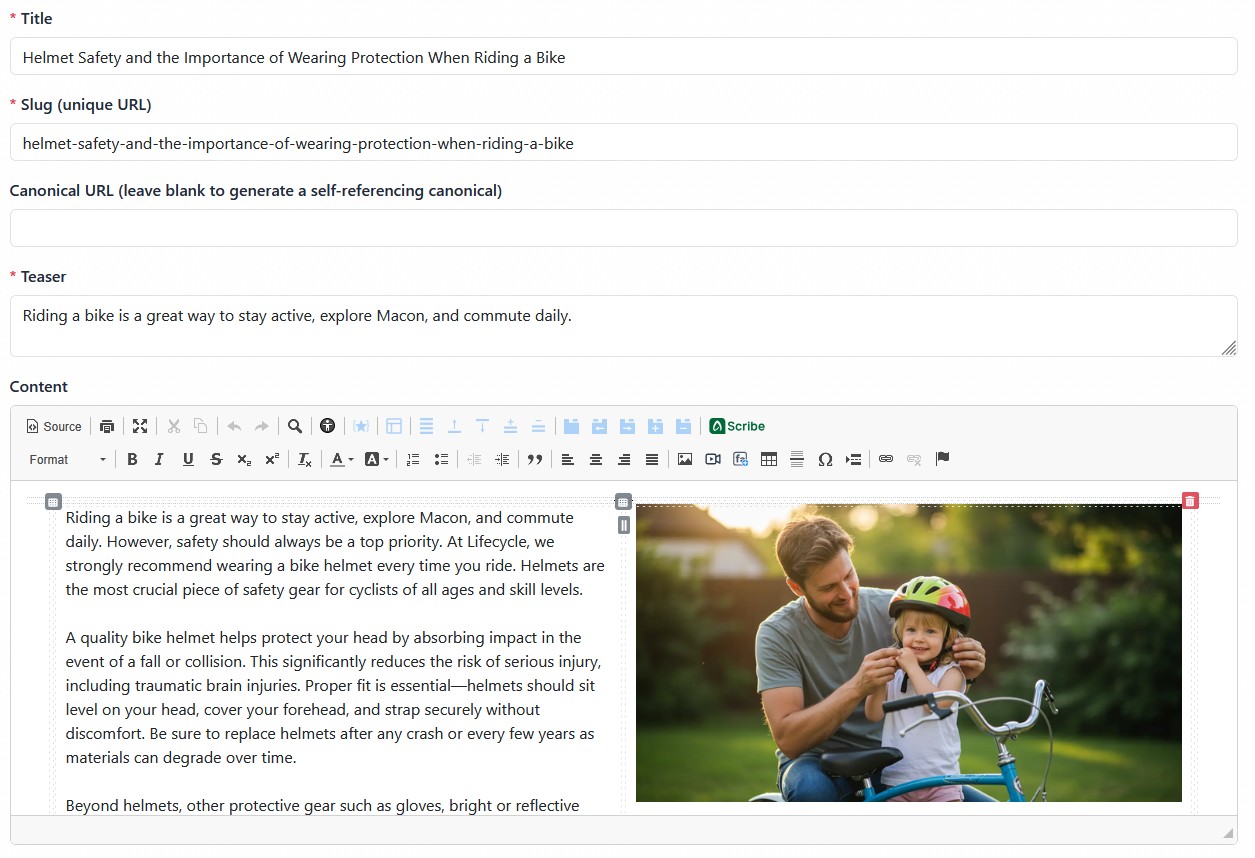
The post content area includes the title, slug, canonical URL, teaser, and main content editor.
Post Identity Fields
The Title field is required. It is the main post headline shown in the CMS and on public Blog pages.
The Slug field is the unique URL-friendly value used in the post's public URL. Use a short, readable slug that reflects the post title. Slugs should be unique and should avoid unnecessary words.
The Canonical URL field is optional. Use it when the post content also appears somewhere else and you want to tell search engines which URL should be treated as the preferred version.
Teaser and Content
The Teaser field is required. It is a short summary that can appear on public list views, cards, search results, archive views, or related-post areas depending on the page configuration.
The Content field is the main post body. Use the editor to write and format the full post.
Scribe is available in the editor where enabled. Scribe can help draft or refine post copy, but AI-generated suggestions should be reviewed by a person before publishing.
Writing Tips
When writing blog post content:
- Keep the title clear and specific.
- Use the teaser to summarize the post, not repeat the title.
- Use the content editor for the full post body.
- Use Canonical URL only when there is a real reason to identify a preferred source.
- Review formatted content carefully, especially if the post includes images, links, or embedded media.
Learn More
For publication details and comment options, see Setting Blog Post Details and Comment Options. For Scribe, see Using Scribe, the AI Writing Assistant.