 Ask Alvin (AI Chat)
Creating and Managing Slideshows
Slideshows are containers for related slides. A slideshow must exist before slides can be added to it.
The controls you see depend on your CMS permissions. Users with restricted permissions may not be able to access all features.
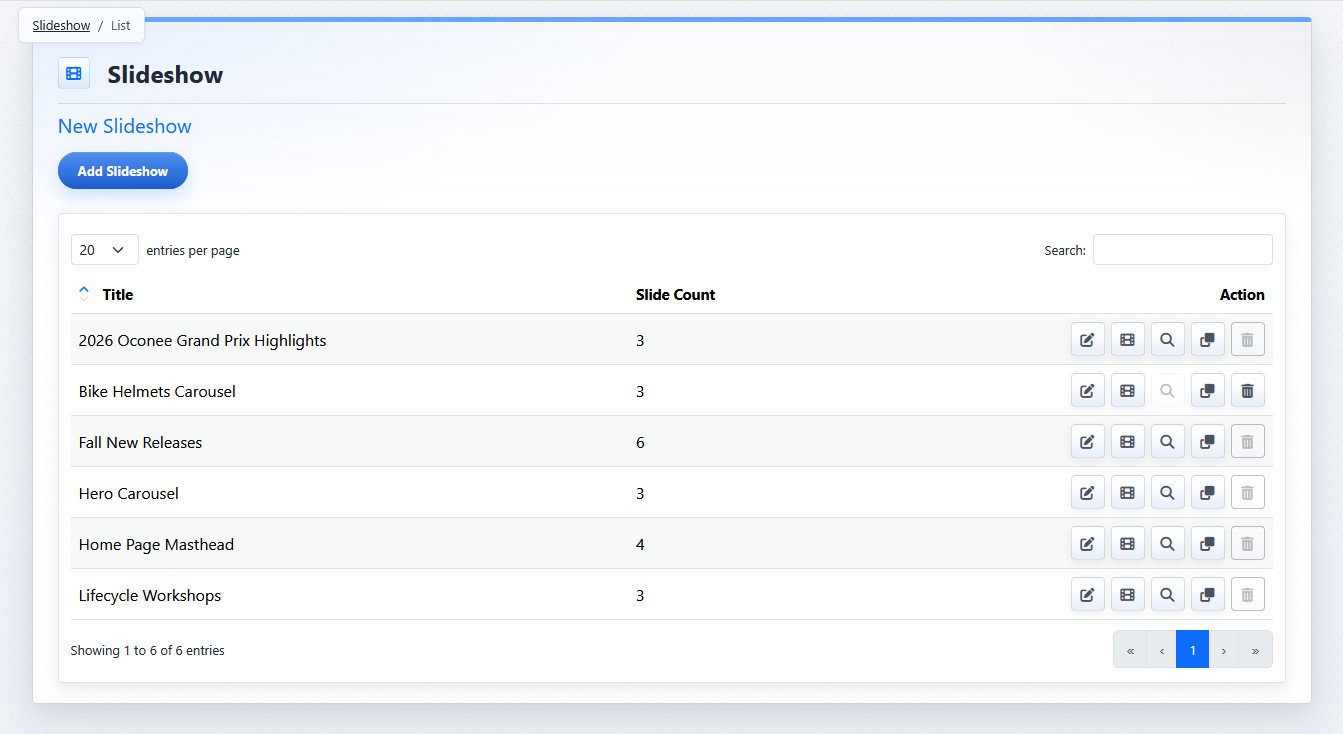
Existing slideshows are listed in the show list view.
Action buttons are used to manage different settings and content associated with each slideshow.
| Action | What It Does |
|---|---|
 |
Settings opens the slideshow settings view so you can rename the slideshow or change settings that affect the slideshow as a whole. |
 |
Slides opens the slide list so you can add, edit, reorder, publish, unpublish, clone, or delete individual slides. |
 |
Locations shows where the slideshow is used before editing or deleting it. |
 |
Clone creates a new slideshow based on an existing one. |
 |
Delete removes the slideshow when deletion is allowed. Delete is disabled when the slideshow is currently used on a page. Remove or replace the slideshow on pages where it is used before deleting it. |
Creating A Slideshow

To create a slideshow:
- Open the Slideshow tool from the Plugins accordion.
- Click Add Slideshow.
- Enter the slideshow title and settings.
- Click Submit.
Learn More
For slideshow-wide settings, see Configuring Slideshow Settings. For managing individual slides, see Managing Slides in a Slideshow. For page-level display setup, see Adding a Slideshow to a Page.