 Ask Alvin (AI Chat)
Configuring Slideshow Appearance and Animation on a Page
The Slideshow content block includes page-level settings that control how the selected slideshow appears and behaves on that specific page.
These settings apply only to the current slideshow block. They do not change the slideshow's master settings.
The page-level configuration includes two sections:
- Slideshow Appearance
- Animation Controls
Configuring Slideshow Appearance
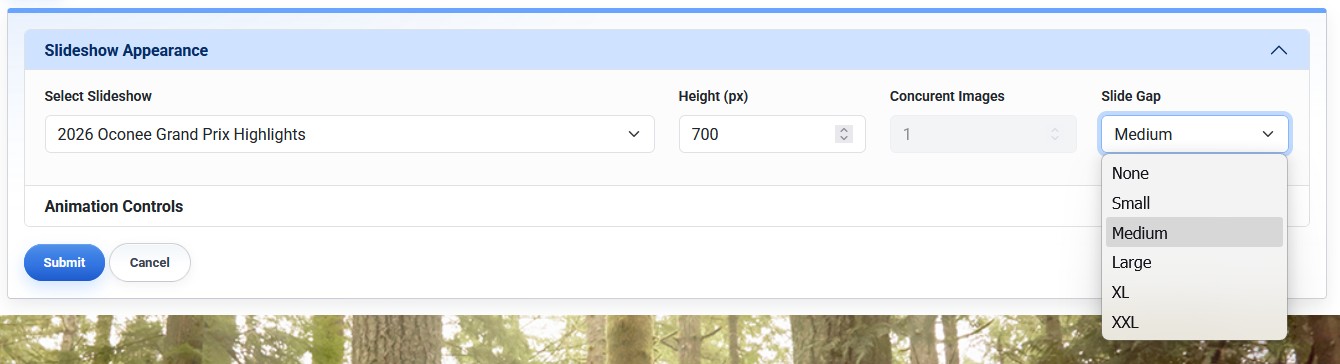
Slideshow Appearance controls which slideshow appears and how much space it uses on the page.
Slideshow Appearance settings include:
- Select Slideshow: chooses which slideshow appears in the block.
- Height: sets the maximum display height for the slideshow block.
- Concurrent Images: controls how many slides display at one time.
- Slide Gap: controls the space between concurrent slides.
Important: Height is a maximum height, not a fixed height. The actual display height is affected by the slideshow's aspect ratio, the width of the page content area, and the number of concurrent images.
Configuring Animation Controls
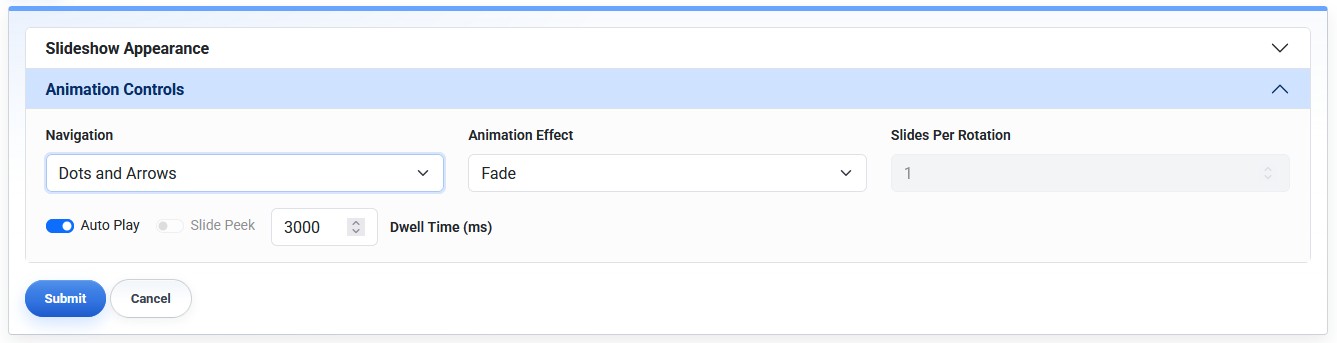
Animation Controls manage visitor navigation and slideshow playback behavior.
Animation Controls settings include:
- Navigation: controls whether visitors see dots, arrows, both, or no navigation controls.
- Animation Effect: controls the transition style. Choose between Fade and Slide.
- Slides Per Rotation: controls how many slides advance at one time. Only available if slideshow is set to show multiple images concurrently.
- Auto Play: controls whether the slideshow advances automatically.
- Slide Peek: shows a partial preview of the next and previous slides when available.
- Dwell Time: controls how long each slide remains visible before advancing.
Some animation settings depend on other settings. For example, Slide Peek is disabled when the animation effect is Fade.
You can use page-level settings when the same slideshow needs to appear differently on different pages.
Learn More
For selecting a slideshow on a page, see Adding a Slideshow to a Page. For slideshow-wide settings, see Configuring Slideshow Settings. For slide order, see Reordering Slides.