 Ask Alvin (AI Chat)
Using Display Rules to Show or Hide Content Blocks
Display Rules let you control whether a specific content block is visible to public visitors. You can use them to hide a block without deleting it, show a block after a certain date, or stop showing a block after a certain date.
Display Rules apply to one content block at a time. They do not hide the entire page.
Open Display Rules
Open Display Rules from the content block's Content Options menu.
The Display Rules window shows the selected block's Content ID, date fields, a Hidden toggle, and Submit and Cancel buttons.
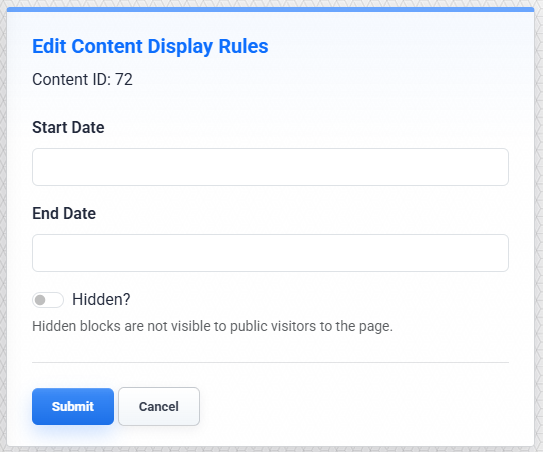
The Display Rules window controls visibility for the selected content block.
Hide a Content Block
Turn Hidden on when you want to keep a block on the page in the CMS but hide it from public visitors.
This is useful when you want to temporarily remove a section from the live page without deleting it. The block remains available for future editing.
Schedule When a Block Appears
Use Start Date and End Date when a block should only appear during a certain period.
Use Start Date when the block should begin appearing on a future date.
Use End Date when the block should stop appearing after a certain date.
Use both fields when the block should appear only during a specific date range.
If both date fields are blank and Hidden is off, the block is visible normally.
Save Display Rules
Click Submit to save the display rules for the selected block.
Click Cancel to close the window without saving changes.
Important: Changing Display Rules counts as an edit to the content block. After saving the Display Rules window, publish the page update so the change takes effect for public visitors.
Common Uses
Use Display Rules when you need to:
- hide a content block while preparing updated copy
- schedule an announcement to appear on a launch date
- show an event registration form only during the registration period
- remove a slideshow from public view after a campaign ends without deleting it
What to Remember
Display Rules control public visibility for the selected block. Logged-in CMS users may still see and edit the block while working in the CMS.
Display Rules do not delete, archive, or move the block. They only control whether public visitors can see it.
After changing Display Rules, remember to publish the page. Until the page update is published, public visitors will continue to see the previously published version of the block.
Learn More
For the page menus used to open Display Rules, see Accessing the Content Editor. For finding pages with unpublished changes, see Getting Started with the Publish Tool. For editing regular content blocks, see Getting Started with the Content Editor. For recovering removed content, see Accessing and Reviewing Recycled Items.