 Ask Alvin (AI Chat)
Getting Started with the Publish Tool
The Publish Tool helps you find pages that have changes waiting to be published. It gives you one place to review pages that are out of sync with the live website, then jump directly to the page that needs attention.
The Publish Tool does not publish pages by itself. Instead, it helps you find the page and open it in the CMS so you can review the changes and publish from the page editor.
Open the Publish Tool
Open Publish from the Content section of the Mobi console.
When the tool opens, you will see a list of pages that have unpublished changes. If no pages are waiting to be published, the list will be empty.
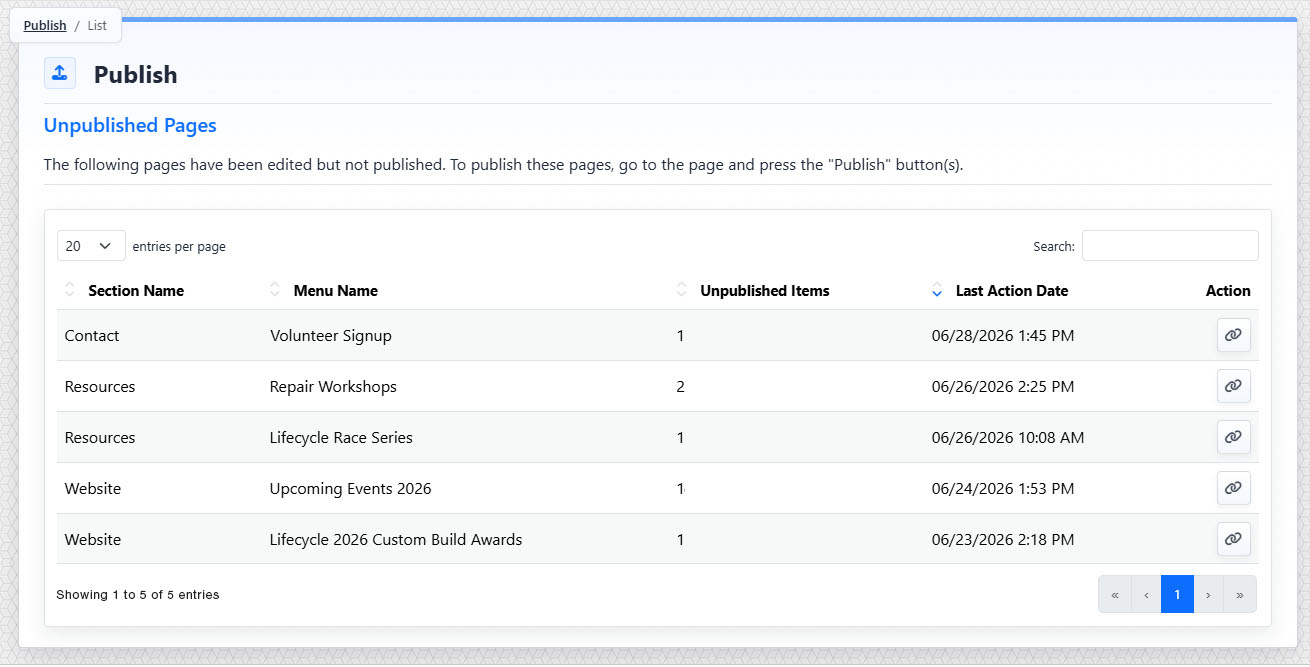
The Publish list shows pages with unpublished changes and provides a link to open each page in the editor.
Review Unpublished Pages
Each row in the Publish list represents one page with unpublished changes. A page appears only once, even if more than one change has been made to that page.
Use the table to understand where the page is, what page needs attention, and how recently it was changed.
| Column | What it means |
|---|---|
| Section Name | Where the page lives on the site. |
| Menu Name | The name of the page. |
| Unpublished Items | The number of publish actions still needed for that page. |
| Last Action Date | When the most recent unpublished change was made. |
| Action | A link button that opens the page. |
Understand Unpublished Items
The Unpublished Items number tells you how many publish actions are needed to bring the page fully up to date.
For many pages, this number will be 1. If the page has changes in more than one publishable area, the number may be higher.
Common changes that can place a page in the Publish Tool include editing content, adding content, removing content, or reordering content areas on the page.
Open and Publish a Page
To work on a page, click the link button in the Action column.
The page opens in a new browser tab. From there, review the page and use the page editor's Publish controls to publish the changes.
After the page has been fully published, it will no longer appear in the Publish Tool the next time the list is refreshed.
Search and Sort the List
Use Search when you need to find a specific page, section, or date in the list.
You can also sort the table columns to organize the list. By default, the most recently changed pages appear first.
Use the entries-per-page control if you need to show more or fewer rows at one time.
When to Use the Publish Tool
Use the Publish Tool when you want to check whether any pages are waiting to be published, find pages with recent unpublished edits, or quickly open the page that needs publishing.
Remember that publishing happens from the page editor, not from the Publish Tool list.
Learn More
For working in the page editor after opening a page, see Getting Started with the Content Editor. For page-level publishing access, see Setting Page Permissions for Individual Pages. For access to content tools such as Publish, see Setting Content Permissions.