 Ask Alvin (AI Chat)
Setting Event Dates, Times, and All-Day Events
Event date and time settings determine when an event appears on the public calendar.
Use these controls for standard non-repeating events. Repeating events use additional recurrence settings.
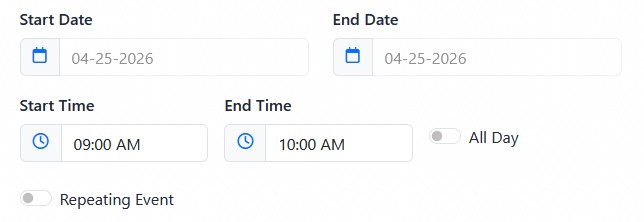
Standard event scheduling uses start and end dates, start and end times, and the All Day toggle.
The Start Date field sets the event's first date.
The End Date field sets the event's final date.
For a single-day event, Start Date and End Date are usually the same.
For a multi-day event, End Date should be later than Start Date.
The Start Date cannot be later than the End Date. The End Date cannot be earlier than the Start Date.
Start Time and End Time control when the event begins and ends on the selected date.
For a single-day event, End Time must be later than Start Time.
The All Day toggle is used when an event lasts the full day and does not need specific visible start and end times.
To set a standard event schedule:
- Open the event detail view.
- Set the Start Date.
- Set the End Date.
- Enter Start Time and End Time, or turn on All Day.
- Review the Publish setting.
- Click Submit.
If you change the start date or start time, the system helps preserve logical date and time relationships where possible.
The controls you see depend on your CMS permissions. Users with restricted permissions may not be able to access all features.
Learn More
For repeating schedules, see Creating Repeating Events. For editing the rest of the event record, see Adding or Editing a Calendar Event.