 Ask Alvin (AI Chat)
Importing Calendar Events
Calendar events can be imported from Excel files or from external calendar files.
Import is intended for bulk event creation or large updates prepared outside the CMS.
Before importing, export the current calendar data. The export gives you a backup and provides the safest template for spreadsheet-based imports.
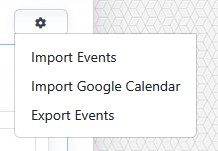
The import/export menu is where you start Excel imports, external calendar imports, and calendar exports.
Imported events are created as single events. Recurrence settings are not imported. If imported events need repeating schedules, add recurrence manually after import.
The controls you see depend on your CMS permissions. Users with restricted permissions may not be able to access all features.
Excel Import
Use Excel import when you have event data prepared in a supported spreadsheet.
Supported Excel formats include:
.xls.xlsx
The import workbook must follow the expected Calendar import structure. The required sheets are:
- Events
- Venue
- Organizer
- Category
The Events sheet must include required event information, including title, start date, end date, start time, end time, and category.
The import process validates dates, times, required fields, column names, and category references before creating records.
If a category listed in the Events sheet does not exist in the Category sheet, the import fails. Organizer and venue references that do not match supporting sheets can import without those optional associations.
When importing without overwrite, the system helps prevent duplicate supporting records by checking values such as tag name, category name, venue name, and organizer email.
Overwrite Existing Data should be used carefully. When overwrite is off, imported records are added to existing calendar data. When overwrite is on, current calendar data is replaced by imported data.
External Calendar Import
Use external calendar import for .ics files exported from another calendar platform.
The .ics import maps calendar file data into standard event fields such as title, start date and time, end date and time, and details.
External calendar recurrence rules are not imported as recurrence settings. Imported records become standard Calendar events inside the CMS.
After import, events can be edited, categorized, tagged, assigned venues or organizers, and converted into repeating events manually if needed.
Importing Events
To import calendar events:
- Open the Calendar tool from the Plugins accordion.
- Open the import/export menu.
- Choose the appropriate import option.
- Read and acknowledge the import warning.
- Select the import file.
- Confirm whether existing data should be overwritten.
- Submit the import.
Review imported records after import to confirm event details, categories, organizers, venues, and dates are correct.
Learn More
For exporting a backup or import template, see Exporting Calendar Events. For adding recurrence to an imported event, see Creating Repeating Events.