 Ask Alvin (AI Chat)
Exporting Calendar Events
Exporting calendar events creates an Excel workbook containing current Calendar tool data.
Use export before making major changes, before importing data, or when you need to review calendar records outside the CMS.
The export file is also the recommended starting point for preparing an import file because it uses the structure expected by the Calendar import process.
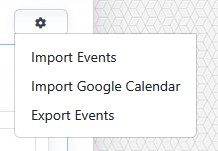
The import/export menu includes options for importing events, importing Google Calendar data, and exporting events.
Export files include multiple sheets representing calendar events and related data such as categories, organizers, and venues.
To export calendar events:
- Open the Calendar tool from the Plugins accordion.
- Open the import/export menu.
- Click Export Events.
The exported workbook is formatted for the Calendar tool's import workflow.
Use the exported workbook as a backup or as a template for preparing bulk calendar updates.
Learn More
For importing calendar records, see Importing Calendar Events.