 Ask Alvin (AI Chat)
Configuring Form Notifications and Email Behavior
Form notification settings control who is notified when a form is submitted and when those notification emails are sent.
These settings are managed in the Form Setup view.
Before configuring notification behavior, select an Email Group. The selected group determines the To, CC, and BCC recipients for notification emails.
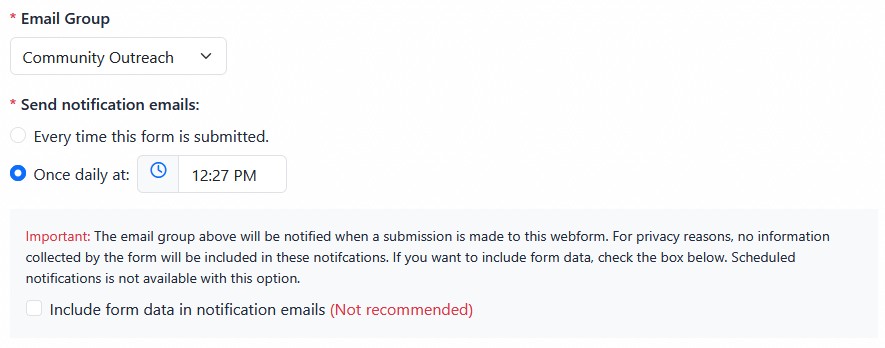
Form notification settings control the email group, notification timing, and whether form data is included in notification emails.
Send notification emails includes two timing options:
- Every time this form is submitted
- Once daily at a selected time
Every time this form is submitted sends a notification email immediately after each submission.
Once daily sends one scheduled notification email that summarizes submissions from the previous period. This can be useful for forms that receive frequent submissions and do not need immediate follow-up.
The Include form data in notification emails checkbox controls whether submitted form responses are included in the notification email itself.
Including form data in email notifications is not recommended. Form submissions can contain personal or sensitive information. For privacy and security reasons, the safer default is to receive a notification that a submission occurred, then review the full submission inside the CMS.
If Include form data in notification emails is enabled, the daily notification option is not available. Form data notifications are sent each time the form is submitted.
When you choose to include form data in notification emails, the CMS displays an additional warning and requires confirmation before that setting can be enabled.
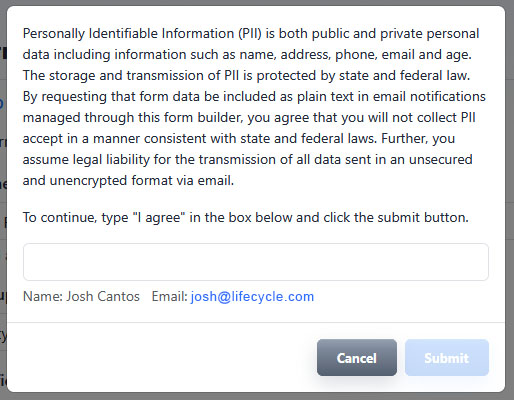
The CMS requires confirmation before submitted form data can be included in email notifications.
The warning is intended to make clear that form data sent through email is less secure than data stored and reviewed inside the CMS. Review this choice carefully before enabling it.
Learn More
For creating notification recipient groups, see Managing Email Groups for Form Notifications. For reviewing form responses in the CMS, see Viewing, Filtering, Exporting, and Deleting Form Submissions.