 Ask Alvin (AI Chat)
Using Permission Templates for Users
Templates can be used when creating a new user or when updating an existing user's permissions.
The controls you see depend on your CMS permissions. Users with restricted permissions may not be able to access all features.
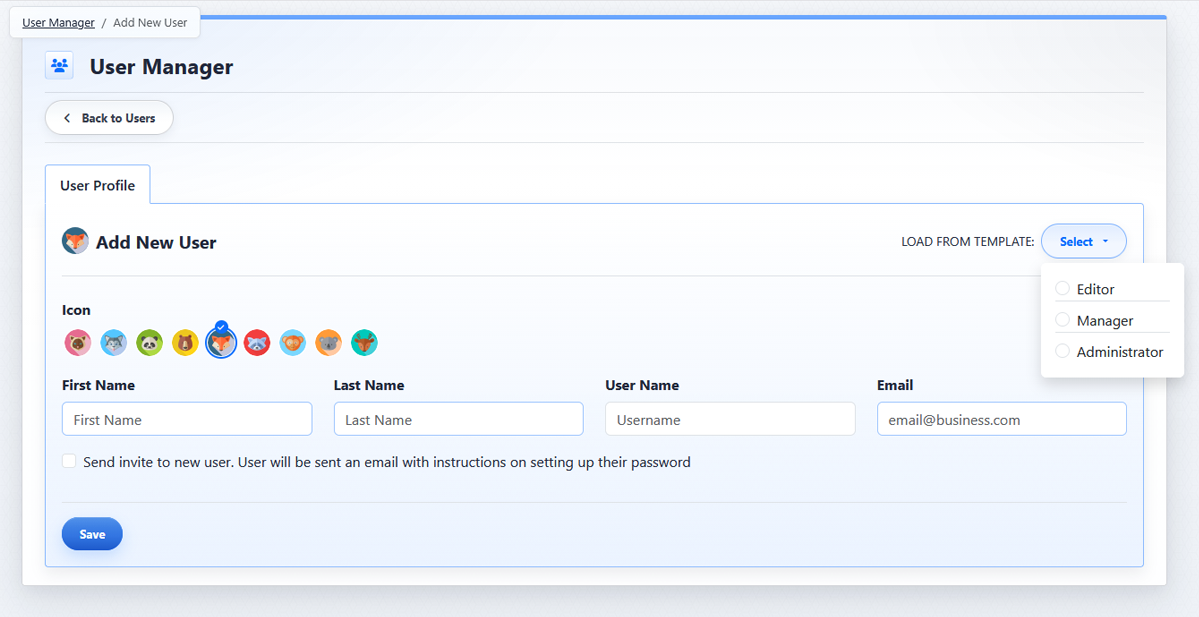
The Load from Template menu lets you apply a saved permission template while creating a user.
Creating a New User from a Template
To create a new user from a template:
- Open the User Manager from the System accordion.
- Click Add New User.
- Complete the user's profile fields.
- Select the Load from Template dropdown menu.
- Select the template to apply.
- Click Save.
When a template is selected during user creation, the user is created with the permissions stored in that template.
Applying a Template to an Existing User
To apply a template to an existing user:
- Open the User Manager from the System accordion.
- Find the user on the Users tab.
- Click the user's Edit button.
- Open the user's permissions.
- Select the Load from Template dropdown menu.
- Select the template to apply.
- Click Save.
Loading a template replaces the current permission selections with the template's saved selections. Review the user's System Permissions and Page Permissions before saving.
Learn More
For creating templates, see Creating and Managing Permission Templates.