 Ask Alvin (AI Chat)
Understanding URL In, URL Out, and URL Hash
The URL fields determine where the redirect starts, where it sends visitors, and whether it points to a specific section of the destination page.
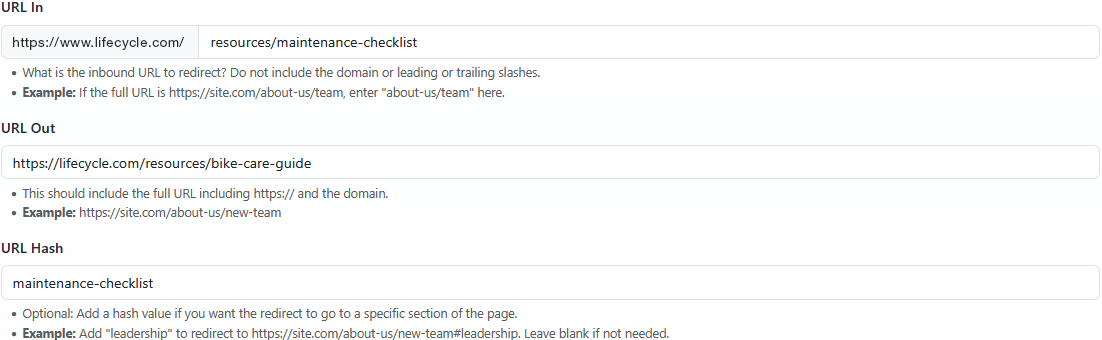
The Redirect Details view includes separate fields for the incoming path, the destination URL, and an optional destination-page hash.
URL In
URL In is the inbound URL path that should redirect. Enter only the path, not the full URL.
Do not include the domain in URL In. Do not include leading or trailing slashes.
Example: if the full old URL is https://site.com/about-us/team, enter about-us/team.
URL In must be unique. Two redirects cannot use the same inbound URL.
URL Out
URL Out is the full destination URL. Include the protocol and domain.
URL Out can point to a page on the current website or to an external website.
Example: https://site.com/about-us/new-team
URL Hash
URL Hash is optional. Use URL Hash when the redirect should point to a specific section of the destination page.
Enter only the hash value. Do not include the # symbol.
URL Hash works only when the indicated anchor tag or matching page section exists on the destination page.
Example: if URL Out is https://site.com/about-us/new-team and URL Hash is leadership, the redirect points to https://site.com/about-us/new-team#leadership.
Leave URL Hash blank when the redirect should go to the destination page normally.
Learn More
For how URL In is matched against incoming traffic, see Exact vs Partial Redirect Matching.